
Instead of manually chasing separate approvals, quotations and pickup messages, organise your corporate car rental purchase order process around one trip record and written booking confirmation. This 2026 guide shows you how to move from an approved transport request to pickup without treating a purchase order as proof that the booking is confirmed.
- Keep the corporate car rental purchase order process tied to one approved itinerary, quotation and booking confirmation.
- VPI Cars suits businesses arranging corporate car rental in Metro Manila and out-of-town Luzon transport.
- Confirm purchase order acceptance and payment requirements before routing the request for company approval.
- Release pickup instructions only after the rental provider confirms the agreed trip details.
Why this matters
A purchase order records your company’s authorisation; it does not replace the rental provider’s booking confirmation. Keep those records separate, then check that they describe the same trip.
An approved request can still contain an outdated pickup address, missing provincial destination or incorrect passenger count. The problem is not solved by forwarding more email. Give one coordinator responsibility for keeping the approved request and provider-confirmed itinerary aligned.
VPI Cars is best for businesses seeking corporate car rental across Metro Manila and Luzon. Its car rental services include with-driver, self-drive and corporate/long-term rentals; confirm the arrangement that fits your itinerary before preparing the purchase order.
Before you start
Prepare these materials before sending the request through procurement:
- Internal access: Your company’s transport request form or shared worksheet, approval route, purchase order process and authorised approver. Identify who can approve itinerary changes after the original request.
- Trip materials: Travel dates, pickup and return details, passenger and luggage requirements, destinations, service preference and a reachable traveller contact. Include every out-of-town Luzon stop in the initial brief.
- The critical check: Ask the provider whether it accepts your company’s purchase order arrangement and what else is required to confirm the booking. Do not assume a purchase order creates credit terms or replaces required documents, payment or an agreement.
The bold field names below are suggested labels for your own worksheet, not buttons in a VPI Cars portal. This process works through your existing documents and agreed communication channel; it does not require a software connection.
Trip request configuration
Build the transport brief
- Create a record titled 2026 Transport Request. Assign an internal reference and record the requester, department, approver and transport coordinator.
- Complete Travel dates, Pickup location, Pickup time, Destinations and Return arrangements. Write full addresses rather than building nicknames that an external provider cannot interpret.
- Add Passenger count, Luggage, Equipment and any access requirements. State the actual load instead of choosing a vehicle solely from its seating description.
- Set Service type to the arrangement you want quoted. Explain whether you need someone to drive, an employee-operated rental or recurring company transport.
- Record Traveller contact and Change owner. The traveller handles pickup communication; the change owner approves departures from the agreed scope.
For a planning example, a request for 8 passengers, 2 rental days and 3 site stops needs more detail than “transport for a meeting”. Add luggage, equipment, stop addresses and whether the group returns together. These are example planning inputs, not vehicle capacities or booking terms.
Match the service to the work
Use this comparison to frame the quotation request. These are service-selection considerations, not promises about a particular booking.
| Service option | Best for | Practical benefit | Planning consideration |
|---|---|---|---|
| Car rental with driver | Meeting schedules, visitor transport and site visits | Travellers do not need to take the driving role | Confirm the itinerary, service hours and treatment of schedule changes |
| Self-drive rental | Trips where an eligible employee will drive | Your nominated driver handles the journey directly | Confirm driver requirements and responsibilities before approval |
| Corporate/long-term rental | Recurring company vehicle requirements | Lets procurement define an ongoing transport requirement | Agree the duration, authorised use and change arrangements before committing |
Do not assume corporate/long-term rental automatically determines who drives. State that requirement separately when requesting a quotation.
Expected result: The transport brief explains who is travelling, where they are going and what service they need. Procurement can review it without reconstructing the itinerary from messages.
Quotation and approval configuration
Make the quotation match the request
- Send the transport brief to the provider. Ask for a written quotation tied to the same dates, destinations, passenger requirements and service type.
- Record Quotation reference and Quotation date in your worksheet. Keep the received document alongside the request so approvers review the actual proposed scope.
- Check Included services, Exclusions, Payment requirements and Required documents. Ask how waiting, additional stops, tolls, parking and out-of-town arrangements are handled where relevant; do not assume they are included or excluded.
- Resolve unclear terms before approval. If the provider revises the quotation, mark the earlier copy as superseded and identify the version being submitted.
- Route the agreed scope through your company’s approval process. Record Approved by, Approval date and Approved scope before creating or releasing the purchase order.
For a Metro Manila pickup followed by a Luzon provincial visit, name the destination and expected return arrangement. “Out of town” is not a sufficiently detailed itinerary for either the provider or your approver.
Prepare the purchase order
Use a suggested 2026 PO Check to compare the purchase order against the approved quotation. Verify the supplier details against documents supplied by the provider, then check dates, service description, quotation reference and your company’s required billing information.
Do not turn an unanswered quotation question into a purchase order assumption. If your company needs particular supporting documents or payment arrangements, raise those requirements before releasing the order.
The same applies to responsibilities. Identify who sends the purchase order, who follows up on booking confirmation and who receives operational instructions. Sending the document is a handoff, not the end of the process.
Expected result: The purchase order refers to a clearly identified quotation and approved itinerary. Unresolved commercial or documentation questions remain visible rather than being mistaken for agreed terms.
Booking confirmation configuration
Separate approval from confirmation
- Send the purchase order through the channel agreed with the provider. Include the quotation reference and current itinerary so the documents can be matched.
- Ask the provider to confirm receipt and identify any outstanding booking requirements. Record the reply under Provider response.
- Complete the requirements communicated for your booking. Follow your company’s approval controls if those requirements change the previously approved arrangement.
- Request written confirmation of the booking details. Check the service type, dates, pickup arrangement, destinations and return instructions against the current trip record.
- Set Booking status to confirmed only after receiving the provider’s confirmation. Keep an unconfirmed request clearly marked as pending.
This distinction matters when a manager sees a purchase order number and assumes transport is settled. Your tracker should show both Internal approval and Provider confirmation, rather than a single ambiguous “done” label.
For your 2026 transport tracker, use the same reference across the request, quotation correspondence, purchase order and booking confirmation. The reference helps colleagues find related records; it does not imply the provider uses your internal system.
Expected result: The coordinator can distinguish an internally authorised trip from a provider-confirmed booking and identify any outstanding action.
Pickup handoff configuration
Give the traveller an operational brief
- Prepare a Pickup brief using the confirmed itinerary, not the first request. Include the travel date, meeting location, agreed pickup time, destinations and traveller contact.
- Add the provider’s operational contact details when supplied. For a with-driver booking, share driver or meeting instructions when the provider communicates them; do not fill gaps with assumptions.
- Tell the traveller which documents or identification the provider has requested. For self-drive, ensure the nominated driver understands the confirmed collection and return requirements.
- Share Change instructions. Tell travellers whom to contact if a meeting overruns, the destination changes or the group needs an additional stop.
- Check that the traveller and coordinator are working from the same current brief. Remove outdated calendar attachments and clearly label superseded instructions.
Your 2026 Pickup Brief should contain operational information, not an unnecessary copy of the full procurement file. Share personal and company information only with people who need it for the booking.
Expected result: The traveller knows where to meet, what to bring and whom to contact. The coordinator retains the approval and booking records needed to resolve questions.
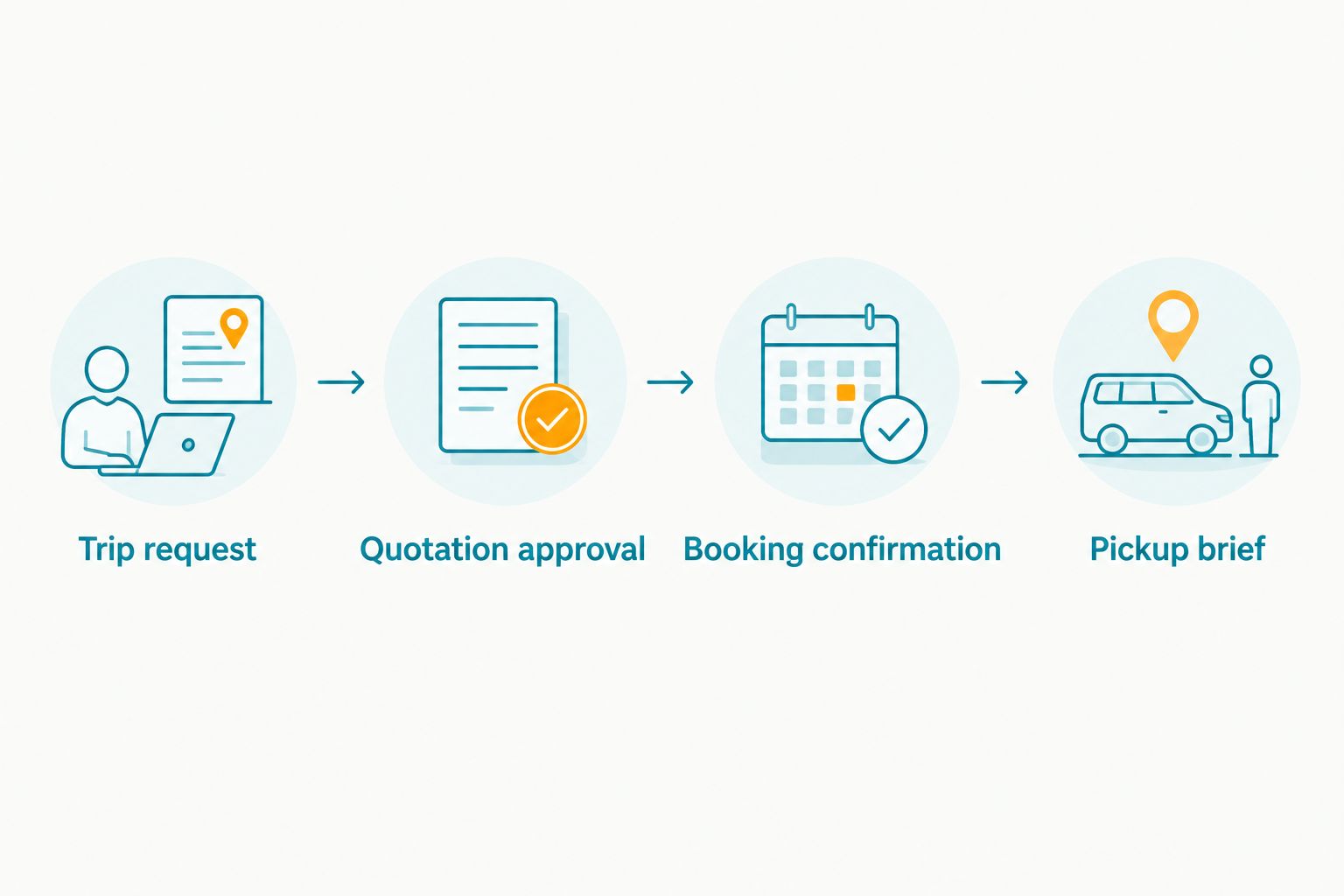
The workflow has four handoffs: Trip request, Quotation approval, Booking confirmation and Pickup brief. Keep each handoff distinct so an unfinished task cannot disappear behind a purchase order number.
When an approved itinerary changes
A revised meeting time or provincial destination needs a change workflow, not a replacement message buried in the original email chain. Keep the confirmed itinerary intact until the revised arrangement is agreed.
- Record Requested change, Requested by and Reason. Describe what differs from the confirmed trip rather than resending the whole itinerary without explanation.
- Ask the provider to confirm the effect on the arrangement and whether a revised quotation or other action is needed. Do not promise the traveller that the change is settled.
- Obtain internal approval where your company requires it. Ask procurement whether the purchase order needs amendment; follow the company’s own process.
- Receive the provider’s confirmation of the revised arrangement. Update the pickup brief and identify the superseded version.
For recurring travel, apply the same control to individual trips and changes to the underlying schedule. A standing company requirement does not mean every new destination has already been agreed.
Expected result: The traveller, coordinator, approver and provider all have the same accepted itinerary. An employee’s request is not mistaken for an authorised booking change.
Troubleshooting
The purchase order is approved, but the booking is pending
Check the provider’s last response for outstanding requirements. Ask directly what remains necessary for confirmation, then assign the action to a named coordinator. Do not tell the traveller that approval alone settles the booking.
The quotation and purchase order describe different trips
Stop the handoff and compare dates, service type, destinations and duration. Correct the relevant document through the appropriate approval route, then ask the provider to confirm the matching scope.
The traveller receives conflicting pickup instructions
Identify the latest provider-confirmed arrangement. Withdraw outdated calendar entries or attachments and resend one current brief to the traveller and coordinator.
A provincial stop was added after approval
Send the full revised Luzon itinerary to the provider and request confirmation of the implications. VPI Cars supports out-of-town Luzon travel; the specific itinerary still needs to be agreed and reflected in the booking documents.
Accounts cannot match the supporting documents
Compare the company name, quotation reference, purchase order reference and service dates across the records. Ask the relevant party to clarify or correct mismatches rather than editing supplier-issued documents yourself.
Customize your workflow
Keep a reusable 2026 Corporate Transport Checklist, but separate fixed company requirements from trip-specific details. Approval roles and procurement instructions belong in the template; dates, passengers and destinations belong in each request.
For recurring meetings, add a schedule owner and a process for reporting exceptions. For multiple travellers, identify who can request changes and who can approve them. Avoid making every passenger an informal booking coordinator.
When you are ready to request a quotation, send VPI Cars the passenger count, itinerary, rental duration and preferred service arrangement. Use the contact page to explain your company’s purchase order requirements before assuming they fit the booking process.
FAQ
Does a purchase order confirm a corporate car rental booking?
A purchase order does not replace the rental provider’s booking confirmation. Ask the provider to confirm the booking and identify any remaining requirements before issuing final pickup instructions.
What should a corporate car rental purchase order refer to?
The purchase order should refer to the approved quotation and accurately describe the agreed rental scope. Check supplier details, service dates, service description and the information required by your company’s procurement process.
Can my company assume it will receive credit terms when it sends a purchase order?
No. Confirm purchase order acceptance and payment requirements directly with the provider before routing the booking for approval; do not treat an internal document as an agreed payment arrangement.
Can VPI Cars handle corporate trips outside Metro Manila?
VPI Cars supports corporate car rental in Metro Manila and out-of-town Luzon travel. Include the full itinerary, dates, passenger requirements and return arrangements when requesting a quotation.
What happens if the itinerary changes after the purchase order is issued?
Ask the provider to assess the revised itinerary and follow your company’s change-approval process. Obtain confirmation of the revised arrangement before replacing the traveller’s pickup instructions.
Do I need software to manage the purchase order-to-pickup process?
No dedicated software is necessary for this workflow. A shared trip record, controlled document versions and written approvals can keep the request, purchase order and confirmed itinerary aligned.
One last thing
Make “confirmed” a controlled status, not a casual description. Before marking a trip confirmed, require the coordinator to identify the provider’s confirmation and the itinerary it covers. That simple rule keeps a purchase order number from becoming an accidental promise to the traveller.
Related guides
- Connecting a recurring meeting schedule to monthly chauffeur bookings
- Connecting your expense system to monthly car rental invoicing
- Connecting a corporate onboarding checklist to vehicle assignment