
Instead of chasing HR emails and transport requests separately, connect corporate vehicle assignment onboarding to a shared approval checklist so every employee rental has an owner, an agreed itinerary and a documented handover. This guide shows you how to build that process for Metro Manila and out-of-town Luzon work trips without assuming a rental provider connects to your HR software.
- Corporate vehicle assignment onboarding should separate internal approval, provider confirmation and employee handover.
- VPI Cars supports corporate car rental, self-drive and with-driver requirements across Metro Manila and Luzon.
- Choose the rental arrangement around the employee’s duties, passenger requirements and itinerary.
- Keep licence documents restricted; share only the information needed for the rental request.
Why this matters
An employee’s start date does not confirm a rental booking. HR can approve an onboarding checklist while transport details remain unresolved: who will drive, where the employee will travel and who can authorise changes.
VPI Cars is a practical corporate car rental choice for businesses arranging employee travel in Metro Manila and Luzon. Its car rental services include self-drive, with-driver and corporate/long-term arrangements. This workflow helps you define the requirement before requesting a quotation; it does not describe a provider software integration.
For your 2026 onboarding checklist, keep employment approval separate from transport approval. That distinction prevents a completed HR task from being mistaken for permission to collect or use a vehicle.
Before you start
- Access and ownership: Use a company-approved spreadsheet, task board or HR checklist. Give HR, the employee’s manager and the transport coordinator access appropriate to their responsibilities, and name a backup owner.
- Request materials: Gather the employee’s business travel requirement, proposed rental dates, passenger and luggage needs, destinations, cost centre and approving manager. Ask the provider what driver documents are required before collecting them.
- The gotcha: Internal approval is not provider confirmation. Build separate checkpoints for the approved request, confirmed rental arrangement and completed handover; never let one checkbox represent all three.
You can run this process manually. The bold field and status names below are suggested labels for your own checklist, not existing buttons or settings in a rental provider’s system.
Choose the arrangement before assigning a car
Vehicle assignment should start with the work, not an assumed vehicle type. A new employee attending meetings needs a different transport brief from someone making recurring provincial site visits.
Use this comparison to define the request. These are planning considerations, not statements about specific rental terms.
| Arrangement | Best for | Practical benefit | Responsibility or trade-off |
|---|---|---|---|
| Self-drive rental | Employees whose duties require them to drive between work locations | The employee handles the driving between agreed destinations | Confirm driver eligibility, authorisation, parking and the rental agreement’s conditions |
| Car rental with driver | Employees who need transport between meetings or site visits without driving themselves | Driving is assigned to a driver rather than the employee | Specify pickup times, stops, waiting requirements and schedule changes clearly |
| Corporate/long-term rental | Businesses with recurring or extended employee transport requirements | The request can cover an ongoing business need rather than an isolated trip | Define assignment ownership, review dates and the process for changed duties or personnel |
Corporate/long-term describes the business arrangement and duration; it does not automatically settle who drives. State that separately in the request.
Choose self-drive only after checking the intended driver’s requirements; choose with-driver transport when the employee does not need to drive. Ask VPI Cars to quote against the actual duties and itinerary rather than treating either arrangement as the default.
Employee request record
Create the request record before sending a quotation enquiry. Your 2026 template should make the business need understandable without a separate email explanation.
- Create a record with Request reference, Employee name, Department, Manager and Transport coordinator. Use a reference that does not expose sensitive personal information.
- Add Business purpose, Rental start, Rental end, Passenger count, Luggage or equipment, Pickup location and Destinations. Distinguish the employee’s joining date from the required transport start date.
- Add Driving arrangement and Intended driver. For with-driver requests, identify the employee who will coordinate pickups rather than presenting that person as the driver.
- Record Cost centre, Approver and Review date. Keep identity and licence documents outside the general checklist in an approved restricted location.
For example, an illustrative brief might specify 4 passengers, 2 site visits per week and 3 rental months. Those are sample planning inputs, not vehicle specifications or provider terms. Add the actual destinations and equipment before requesting a quotation.
Expected result: the transport coordinator can explain who needs transport, what the work involves and when the arrangement should begin and end.
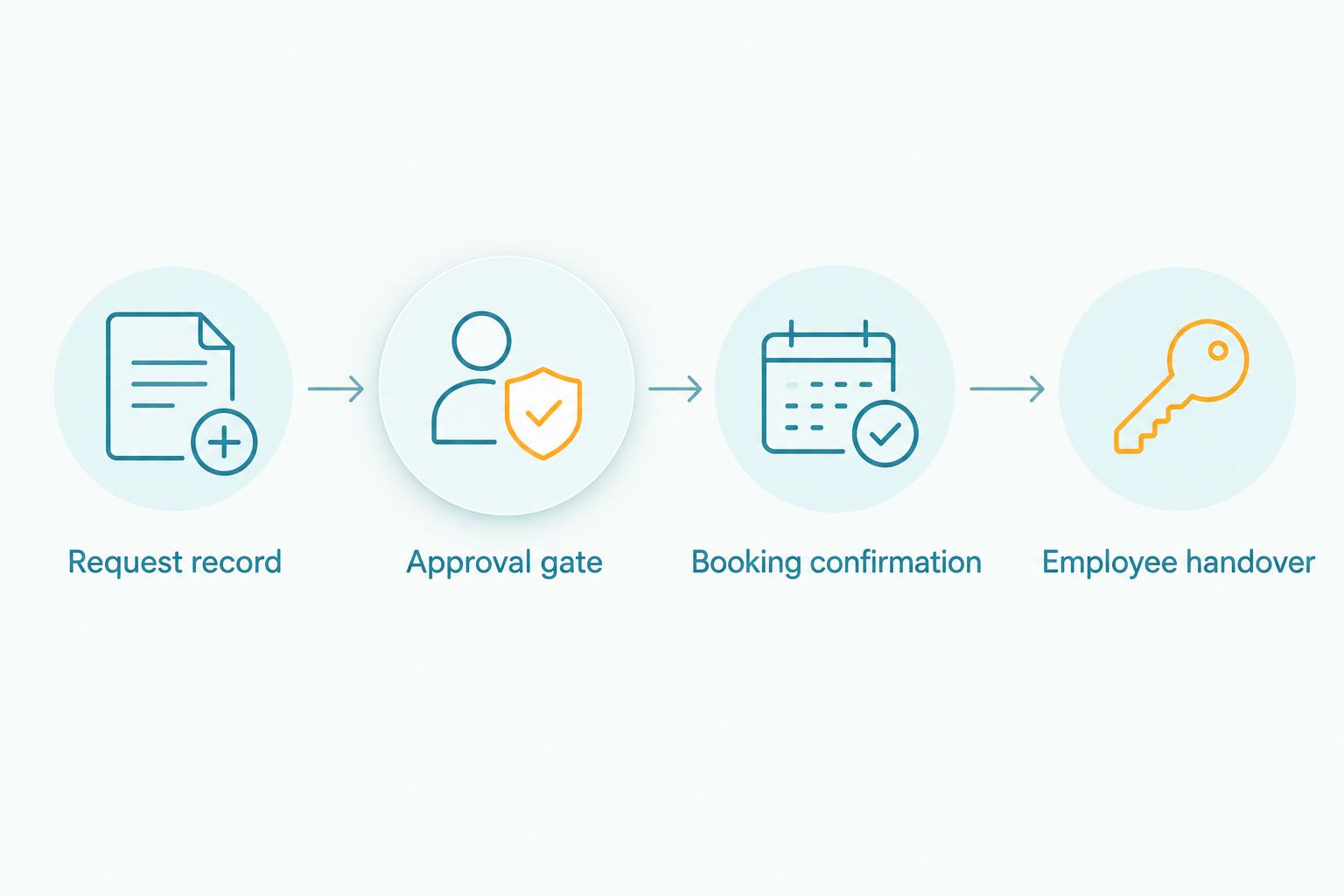
Approval gate
Make approval a decision about a defined requirement, not a general permission to rent whatever seems suitable. Add these checks to the 2026 approval record.
- Set Request status to Awaiting approval. Ask the manager to confirm the business purpose, expected travel pattern and rental duration.
- Have the budget owner confirm Cost centre and Quotation approver. Record who can approve the quotation and who can authorise later changes.
- Check Driver review where self-drive is requested. Ask the rental provider to confirm its requirements; do not treat a licence upload as automatic acceptance.
- Record Approved scope, including destinations, passenger requirements and driving arrangement. Set Request status to Approved for quotation only when the relevant owners have agreed.
Keep the approval scope specific. “Business travel” leaves too much open; “client meetings in Makati and scheduled site visits in Laguna” gives the coordinator a usable itinerary brief without promising a particular route or travel time.
Expected result: you have permission to seek a quotation for a defined requirement, not a confirmed booking or permission to release a vehicle.
Booking confirmation
Send the approved brief to the provider, then record the response against the same request reference. Do not assume details discussed informally have become confirmed booking instructions.
- Send Approved scope, proposed dates, passenger and luggage requirements, driving arrangement, pickup details and destinations. Identify the company contact responsible for questions.
- Request a written quotation showing the proposed arrangement, inclusions, exclusions and applicable conditions. Ask how changes, extensions and returns are handled rather than assuming a policy.
- Compare the quotation with the approved brief. Resolve differences in dates, intended use, driver requirements or itinerary before the authorised person accepts it.
- Record Provider confirmation, Confirmed arrangement, Pickup instructions and Rental documents. Change the status to Booking confirmed only after receiving explicit confirmation.
VPI Cars supports out-of-town Luzon transport as well as Metro Manila travel. Include destinations such as Laguna or Pampanga in the initial brief when relevant; confirm the individual itinerary, dates and vehicle requirements without assuming a pickup branch exists there.
Expected result: your internal record matches the confirmed rental arrangement, with unresolved questions identified before handover.
Employee handover
A confirmed booking still needs an employee briefing. Use the 2026 handover record to connect the agreed rental terms with the person responsible for daily use or pickup coordination.
- Share Confirmed arrangement, Pickup instructions, relevant rental conditions and the company’s travel rules. Ask the employee to acknowledge receipt through your approved channel.
- For self-drive, complete the provider’s handover process and document vehicle condition as instructed. Record any existing damage through the agreed channel before departure.
- For with-driver travel, confirm the pickup contact, meeting point, stops and communication arrangements. Tell the employee who handles changes to the agreed itinerary.
- Complete Employee acknowledgement, Company coordinator and Review date. Mark Assignment active only after the relevant handover or pickup arrangements are complete.
Explain the distinction between reporting a problem and authorising a change. An employee can alert the coordinator to an issue without automatically having authority to extend the rental or alter its agreed use.
Expected result: the employee knows the arrangement, the company knows who owns it, and the record shows when responsibility began.
Update the assignment when an employee’s role changes
Use the same workflow when an employee transfers teams, changes duties or no longer needs the rental. A new hiring event is not the only reason to review vehicle assignment.
- Add Change reason, Effective date and Requested scope to the existing record. Preserve the original approval and confirmation history.
- Reconfirm the business purpose, destinations, passenger requirements and driving arrangement with the manager.
- Ask the provider to confirm any proposed driver change, extension, return or altered itinerary before implementing it.
- Record the accepted change and brief the employee. For an ending assignment, complete the agreed return process and close the record after outstanding responsibilities are resolved.
Do not transfer a self-drive rental to another employee solely by changing a name in the HR checklist. Provider authorisation and the rental agreement still govern use.
For recurring assignments, put a review date in the record. Treat the 2026 checklist as an operating record that changes with the employee’s duties, not a form completed once and forgotten.
Troubleshooting
HR says complete, but transport is not confirmed
The checklist has combined unrelated decisions. Keep HR onboarding complete separate from Booking confirmed, and leave the transport task open until the provider confirms the arrangement.
A licence is uploaded, but driver acceptance is unresolved
Document collection has been mistaken for verification. Ask the provider to confirm its requirements and the intended driver’s acceptance before treating the self-drive request as ready.
The quotation does not match the employee’s itinerary
Compare the quotation with Approved scope. Send a corrected brief covering destinations, stops, passengers, luggage and dates, then obtain approval for the revised arrangement before acceptance.
Different teams hold different instructions
Choose an authoritative request record and name its owner. Log the latest confirmed revision there, notify affected people and retain earlier versions as history rather than competing instructions.
A replacement employee needs the car immediately
Do not pass over the keys based only on a manager’s message. Confirm the proposed driver or assignment change with the provider, complete the company approval and update the handover record.
Customize your workflow
Keep a single request record, but adjust the required fields to the work. Recurring meetings need stop patterns and pickup contacts; site visits need destinations, equipment details and intended travel dates. Long-term assignments also need a review owner and an end-of-assignment process.
If your company later automates reminders, automate notifications first. Keep approval and booking confirmation as explicit decisions. A reminder can flag an incomplete task; it cannot establish that a rental arrangement has been accepted.
Prepare the brief before requesting a quotation. Include the business purpose, dates, passenger count, destinations and preferred driving arrangement so VPI Cars can respond to a defined corporate car rental requirement.
Request a corporate rental quotation
Share your dates, passenger requirements, itinerary and preferred driving arrangement.
FAQ
What is corporate vehicle assignment onboarding?
Corporate vehicle assignment onboarding connects an employee’s transport requirement to company approval, rental confirmation and handover. It records who needs transport, who approves it and who owns the arrangement after it starts.
Can I manage employee rental assignments without an HR integration?
Yes, you can manage employee rental assignments with a company-approved spreadsheet or checklist. Use separate statuses for internal approval, provider confirmation and handover, and assign an owner to each decision.
What information should I send for a corporate rental quotation?
Send the business purpose, rental dates, passenger and luggage requirements, destinations, pickup details and preferred driving arrangement. Identify the company contact and ask the provider which supporting documents it requires.
Should a new employee get self-drive or a car rental with driver?
Choose according to the employee’s duties and whether the employee needs to drive. Self-drive requires confirmation of driver requirements; with-driver transport requires clear pickup, stop and schedule instructions.
Can VPI Cars support employee trips outside Metro Manila?
Yes, VPI Cars supports out-of-town and provincial transport within Luzon as well as Metro Manila travel. Confirm the individual itinerary, dates and vehicle requirements when requesting a quotation.
Can another employee use an assigned self-drive rental?
Do not assume another employee can drive an assigned rental. Obtain the provider’s confirmation of the proposed driver change and follow the rental agreement before transferring responsibility.
How should I handle a rental when an employee leaves?
Start the assignment closure process and follow the agreed return instructions. Record the handover or return outcome, resolve outstanding responsibilities and close the internal assignment record.
One last thing
Put an end date or review date beside every start date. Onboarding starts the assignment, but role changes, extended projects and departures determine when it should change or stop. That small checklist requirement keeps an employee rental connected to an active business need.
Related guides
- Connect your HR travel policy to a long-term rental account
- Connect recurring meetings to monthly chauffeur bookings
- Plan car rental for construction site visits